Custom Object Detection Models: Data, Training and Deployment
What it typically takes to build a custom object detection model, from collecting and labelling data to training, evaluation and running it on edge or cloud hardware.
By Neo Forge Team · 11 Oct 2026 · 5 min read

Off-the-shelf object detection models are good at finding people, cars and common household items. They are much less useful when you need to spot a specific weld defect, count a particular part on a conveyor, or flag missing safety equipment on a site camera. For those problems you usually need a custom model, and the model itself is often the smallest part of the work. Most of the effort goes into data, evaluation and getting the model running reliably where it is actually needed.
This article walks through what a custom object detection project typically involves, so you can judge the effort before committing to one.
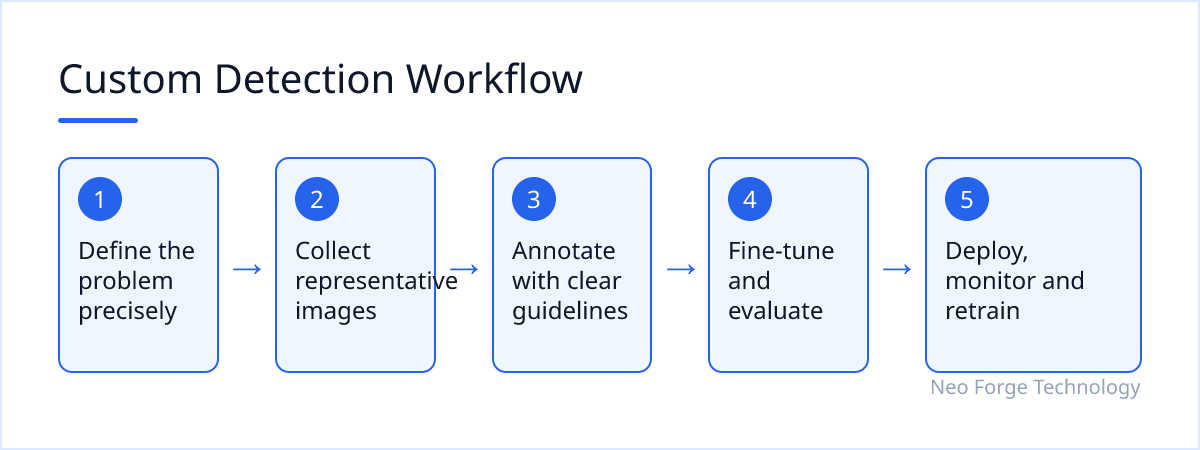
Start With a Precise Problem Definition
Before collecting a single image, it helps to pin down exactly what the model must do. Vague goals like "detect defects" lead to vague datasets and disappointing results.
Useful questions to answer early:
- What are the object classes? List them explicitly and decide how to handle borderline cases.
- What counts as a correct detection? A tight bounding box, a rough location, or just presence in the frame?
- What does a mistake cost? Missing an object and raising a false alarm rarely have the same consequences.
- Where and how fast must it run? A real-time camera feed and an overnight batch job lead to very different designs.
The answers shape every later decision, from how many images you need to which hardware is realistic.
Dataset Collection
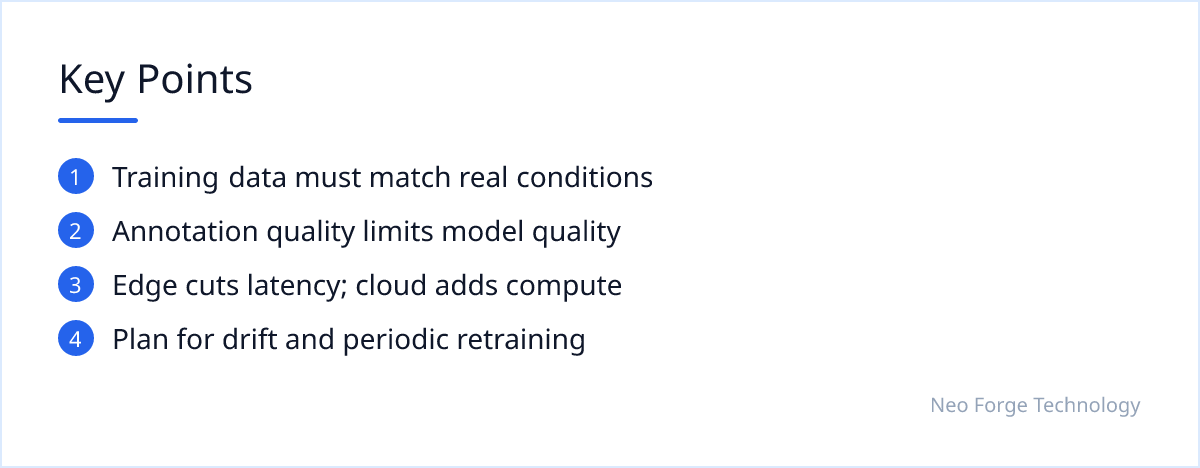
A detection model learns what it sees in training. If your training images do not resemble the images it will face in production, performance usually drops sharply once deployed.
Match real operating conditions
Collect images from the same cameras, angles, lighting and environments the model will use. Include the awkward cases: glare, motion blur, partial occlusion, dirty lenses, night shifts. These are often where models fail, so they belong in the data.
Balance and coverage
Rare classes are a common problem. If one defect type appears in only a handful of images, the model will struggle to learn it. Sometimes this means deliberately staging examples, collecting over a longer period, or using carefully chosen augmentation. Synthetic data can help in some cases, but it typically needs to be validated against real images.
Annotation
Annotation means drawing boxes (or masks) around each object and assigning a class. It is slow, and its quality directly limits model quality.
Write labelling guidelines
Clear written rules prevent inconsistency between annotators: how tight boxes should be, how to label partially visible objects, what to do with ambiguous examples. Without them, the model learns the noise.
Review and iterate
A review step that spot-checks labels catches systematic errors early. Many teams also use a trained early model to pre-label new images, which humans then correct. This often speeds up later annotation rounds, though it still requires careful human checking.
Model Selection and Training
There are several well-established families of detection architectures, ranging from lightweight single-stage detectors suited to real-time use to heavier models that trade speed for accuracy. The right choice depends on your accuracy needs, latency budget and target hardware.
In most projects the starting point is a model pre-trained on a large public dataset, then fine-tuned on your own images. This transfer learning approach usually needs far less data than training from scratch.
Evaluate honestly
Keep a held-out test set that the model never sees during training, ideally drawn from different days, locations or cameras. Look beyond a single headline metric: check per-class results, review false positives and missed detections by eye, and test on the difficult conditions you collected. Confidence thresholds can then be tuned to reflect the real cost of each type of error.
Deployment: Edge or Cloud
A trained model only creates value once it is running inside a working system.
Edge deployment
Running on a device near the camera, such as an embedded GPU board or industrial PC, typically reduces latency and bandwidth and keeps images on site. The trade-off is limited compute, so models are often optimised through techniques like quantisation or conversion to hardware-specific runtimes, and accuracy must be rechecked afterwards.
Cloud deployment
Cloud inference offers more compute and easier updates, and suits batch processing or scenarios with reliable connectivity. Costs, network latency and data privacy requirements need to be weighed.
The surrounding system
Either way, you need video ingestion, result storage, alerts or integrations with existing software, and monitoring. Production data drifts over time as cameras move, products change or seasons shift, so plan for collecting new samples and retraining periodically.
When Custom Detection Doesn't Fit
A custom model is not always the right answer:
- If an existing pre-trained model or a simple rule-based check already works well enough, a custom model may add cost without benefit.
- If you cannot obtain representative images, for example because the target events are extremely rare, results are likely to be unreliable.
- If the task requires near-perfect accuracy with no human review, detection models may not be suitable on their own; they generally work best with a human in the loop for critical decisions.
- If nobody will own monitoring and retraining, performance tends to degrade quietly over time.
Working With Neo Forge Technology
Our Computer Vision / ML / DL team builds systems that understand images, video and complex data, including custom object detection from problem definition through dataset work, training and deployment on edge or cloud hardware. If you are weighing whether a custom model makes sense for your use case, we are happy to talk through the data you have, the constraints you face and what a realistic first version could look like.
- #Computer Vision
- #Object Detection
- #Machine Learning
- #Edge AI
- #Data Annotation