IFC Data Validation: Building Automated BIM Model Checks
How custom rule-based checks on IFC files catch missing properties and classification errors before handover, and where automated validation stops being useful.
By Neo Forge Team · 12 Oct 2026 · 5 min read

Handover is often the first time anyone looks closely at the data inside a BIM model. The geometry may be coordinated and clash-free, yet the IFC export can still be missing fire ratings, carry walls classified as generic proxies, or use three different spellings of the same system name. Facility managers and owners then inherit a model that looks complete but cannot be trusted as an asset database.
Manual spot checks rarely catch these problems at scale. Automated, rule-based validation of IFC files can, and it does not have to be complicated to be useful.
Why IFC Data Fails Quietly
IFC is a rich, flexible schema. That flexibility is also the source of most data problems. The same information can be stored in different places, and authoring tools export it in slightly different ways depending on mapping settings.
Common issues typically include:
- Missing required properties, such as fire rating, acoustic rating or manufacturer data on elements that the employer's information requirements say must have them
- Wrong entity types, for example doors exported as IfcBuildingElementProxy instead of IfcDoor
- Classification errors, where Uniclass, OmniClass or a client-specific code is absent, malformed or inconsistent with the element type
- Inconsistent values, like free-text fields that should follow a controlled list
- Spatial structure gaps, with elements not assigned to a storey or space
None of these break the model visually. They only surface when someone tries to query, filter or import the data downstream.
What a Rule-Based Check Looks Like
A validation rule is a precise, testable statement about the model. Instead of "doors should be properly documented", a rule says: every IfcDoor must have a FireRating property in Pset_DoorCommon, and its value must be one of an approved list.
Anatomy of a rule
Most useful rules have four parts:
- Applicability: which elements the rule targets (by entity type, classification, storey or property value)
- Requirement: what must be true (property exists, value matches a pattern, relationship is present)
- Severity: whether a failure blocks handover or is a warning
- Message: a plain explanation the modeller can act on
This structure maps closely to buildingSMART's Information Delivery Specification (IDS), which lets teams express requirements in a machine-readable format. Where IDS covers the need, it is a sensible starting point. Custom code fills the gaps IDS does not handle well, such as cross-element logic or project-specific naming conventions.
Checks beyond simple presence
Once the basics run, teams often add rules like:
- Classification code matches the IFC entity type (a code for doors should not appear on a slab)
- Element names follow an agreed pattern
- Every space has a number and a name, and numbers are unique per storey
- Systems referenced by MEP elements actually exist in the model
Building the Validation Pipeline
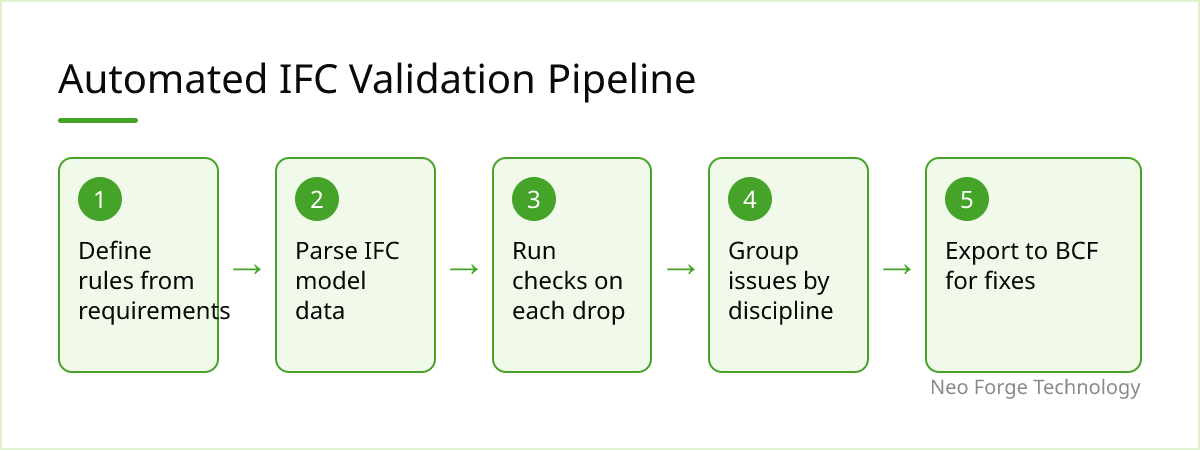
The checks themselves are only part of the work. To change behaviour, validation needs to run often and report clearly.
Parsing and querying
Open-source libraries such as IfcOpenShell make it practical to read IFC files, traverse entities and inspect property sets in Python. For large models, it helps to extract the relevant data once into a simpler structure and run rules against that, rather than repeatedly walking the full IFC graph.
Reporting that people use
A list of thousands of failures is rarely acted on. Better reports group issues by rule and by responsible discipline, include element GUIDs so modellers can locate them in their authoring tool, and can export to BCF so issues appear inside the coordination workflow the team already uses.
Running it continuously
The biggest gain usually comes from moving validation earlier. Running checks on every model drop, rather than only before handover, means problems are fixed while the modeller still remembers the context. Some teams wire this into their common data environment so uploads are checked automatically.
Turning Requirements Into Rules
The hardest part is often not code but clarity. Employer's information requirements are frequently written as prose and leave room for interpretation. Converting them into rules forces decisions: which property set, which exact property name, which allowed values.
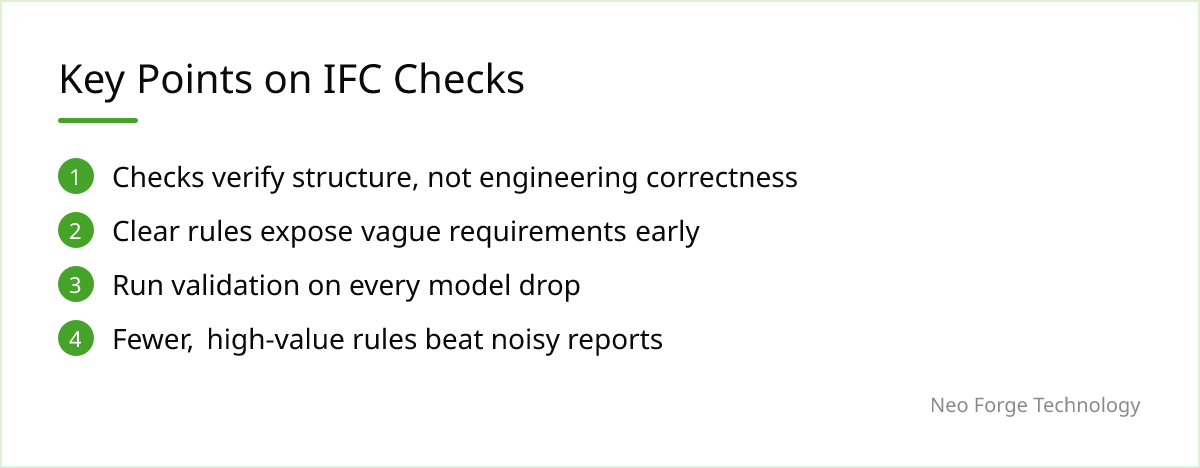
That conversation is valuable in itself. It tends to expose contradictions and vague requirements early, before they become disputes at handover. Keeping rules in a versioned, readable format also lets the client, the BIM manager and the design team agree on exactly what "complete" means.
Limits and When It Doesn't Fit
Automated checks are good at verifying structure and consistency. They cannot tell you whether a fire rating is actually correct for that door, only that one is present and valid in format. Engineering judgement still has to happen.
There are other limits worth stating plainly:
- Export quality sets the ceiling. If authoring tool mappings are wrong, validation will flag the symptoms, but the fix lives in export configuration.
- Small or one-off projects may not justify custom rules. An off-the-shelf checker or a well-built IDS file is often enough.
- Rules need maintenance. As requirements, schemas and classification systems change, rules must be updated or they produce noise that people learn to ignore.
- Over-checking backfires. Too many low-value warnings bury the issues that matter.
Where Neo Forge Technology Fits
Our CAD / BIM & Engineering Software team builds validation tools around the requirements you already have: translating information requirements into executable rules, building IFC parsing and reporting pipelines, and integrating checks into existing authoring tools or data environments. If your team is spending handover weeks chasing missing data, we are happy to talk through whether automated checks make sense for your projects, or whether a simpler approach would serve you better.
- #IFC
- #BIM
- #Model Validation
- #IDS
- #Automation
- #Handover